Every integration, in one place
17 October 2026 · Deliverd Engineering Team · 4 min read
"Does it work with LangGraph?" used to be a harder question to answer than it should have been. The AI assistants were on one page, Slack, Teams and the eval tools on Admin → Integrations, and the framework adapters only in the docs. The answer existed. You just had to know where to look.
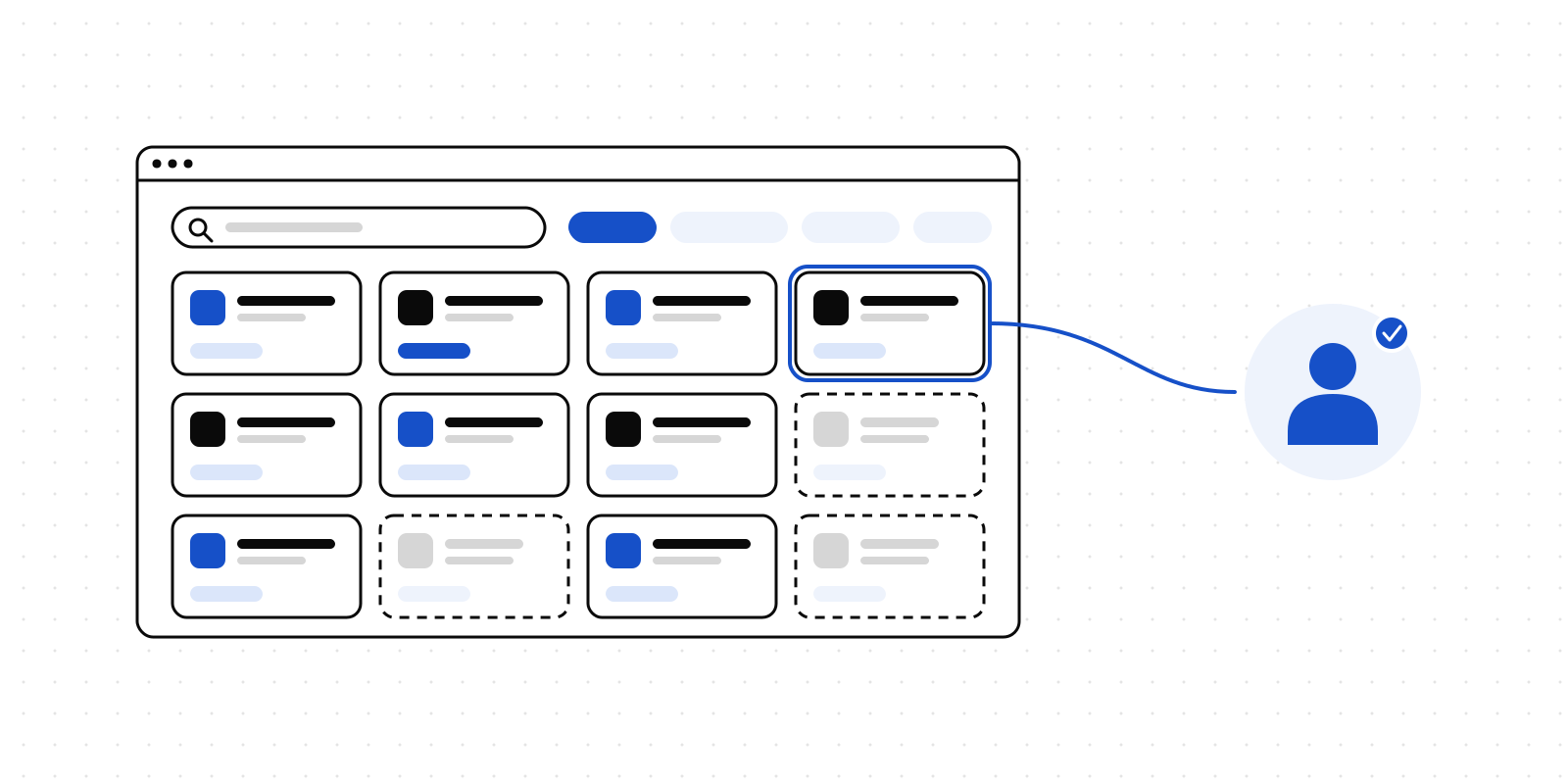
So we put it all on one page. Integrations, at deliverd.dev/connect once you are signed in, now lists everything Deliverd works with: 52 integrations in 9 categories, each with its own page that says how to connect it.
What is on it
The page is grouped the way people look for things:
- AI assistants: Claude, Claude Code, Codex, Cursor, VS Code, ChatGPT, Windsurf, Gemini CLI and Muse Code, over MCP.
- Chat and email: where approvers get the request and decide it. Email, Slack, Microsoft Teams and Discord.
- Agent frameworks: the OpenAI Agents SDK, LangGraph, the Vercel AI SDK, the Claude Agent SDK, Microsoft Agent Framework, Microsoft Foundry, Mastra, CrewAI, Pydantic AI and Meta's Muse Spark, so a person approves a tool call from inside the framework your agent is built on.
- Agent platforms: Amazon Bedrock and Google Vertex AI, whose agents on AgentCore, Bedrock Agents and Agent Engine ask a person before they act, and Hoplite, whose hosted agents stop to ask a person; the question is asked in Deliverd and the answer goes back to the run.
- Automation: webhooks to your own systems, CI/CD pipelines that stop for a person, and a GitHub Actions step that waits for an approval.
- Online stores: Shopify and Wix, where an agent working on your shop asks a person before it refunds, reprices or discounts.
- Evaluation: Langfuse, LangSmith, Braintrust and W&B Weave, read as evidence a release is judged on.
- Developer tools: the TypeScript, Python and Rust SDKs, the command line and the open-source agent skills.
- Identity and sharing: single sign-on, Directory Sync and SharePoint.
There is a search box above the grid, and it matches more than names, so "pipeline", "tokio" or "Entra" finds what you meant.
Each tile tells you where you stand
Every tile carries a status worked out from your own organisation, never a guess: Connected, Always on, Available, An admin sets this up, Not on your plan or Coming soon. "Connected" only appears where Deliverd can check, such as a Slack workspace that is installed or an eval tool your organisation has connected. Everything else says what you can do, not that something is set up when nothing has looked.
Open a tile and you get the instructions for that one integration: the recipe for an AI tool, the install line and the import for an SDK, or a button that takes an administrator to the screen that holds the keys. Keys and installs live on Admin → Integrations (how), which is the administrator's half of the same list: the same categories, names and status, with the form for each one an administrator sets up. This page is where you find things, and the admin screen is where you hand over a secret.
The fastest way is still one paste
At the top of the page is a prompt you copy into Claude Code, Codex, Cursor or Claude Desktop. The agent runs the installer, reads back what it connected, and proves the connection by asking you to approve something. Your part is one click in the browser the first time a Deliverd tool runs. There is no token to paste. If you would rather run it yourself, npx deliverd setup finds the AI tools on your computer and connects them.
Coming soon, said plainly
Some tiles are outlined and marked coming soon: Copilot coding agent, Grok, n8n, Zapier, Make, Power Automate, Microsoft Sentinel, Jira and ServiceNow. Several are already built and waiting on their marketplace listings. They are on the page because "does it work with my tool?" deserves an honest answer today, not silence until launch day. They have nothing to click until they are ready.
The same rule holds for marketplace badges. A tile says "Also available on" only for a listing someone has opened and seen Deliverd on. Today that is the MCP Registry, npm, PyPI, crates.io, NuGet and GitHub. Slack and Microsoft Teams work now, from Admin → Integrations, but their marketplace listings are not live yet, so they show no badge.
Why one list
Under the page is a single registry in the code. Adding an integration is one entry, and the tile, its page, the search and the badges follow from it. Tests hold every badge's link to the marketplace it names, and fail when an integration has no logo. It is the same habit as the rest of the product: if the page says something works, something checked.
Try it
Sign in and open Integrations, or start with the SDK docs if you came to write code. Deliverd is human-in-the-loop infrastructure for AI agents: an agent asks a person for approval, a review, an answer or a decision, and carries on when they respond.