Cursor · MCP
Cursor does the work.
A person signs it off.
Get the right person's approval before Cursor's agent changes production data, messages a customer or ships a change, with the decision kept on the record rather than in a chat that closes by lunchtime. Its approval dialogue asks whoever is in the editor; add one entry to your MCP config and it asks the person who should decide instead, wherever they are.
No card required · Approvals on every plan · No token to paste
The situation
What happens when Cursor needs a person today
The dialogue asks the person in the editor
Cursor stops and asks before a command runs. Useful, until the decision is not yours to make: a change to production data, a message to a customer, a deploy the lead wanted to see first.
The answer disappears with the chat
Approve, and the record of it is a line in a conversation that will be closed by lunchtime. Nobody can later say who allowed the change or what they were shown.
The review never gets back to the agent
Feedback arrives in Slack, out of context, describing a change by roughly where it was. Asked for over the same connection, a review comes back as an answer the agent can act on.
Setup
Connect Cursor
Give the agent in Cursor one call to ask a person for approval, a review or an answer — and a URL for what it builds.
Opens Cursor and asks you to add the server; you approve the connection in your browser. If nothing happens, follow the steps below.
- 1
Or add it to ~/.cursor/mcp.json
{
  "mcpServers": {
    "deliverd": {
      "type": "http",
      "url": "https://deliverd.dev/api/mcp"
    }
  }
}
Keep any servers already listed there — replacing the file removes them.
- 2
Reload Cursor
Then approve the connection in your browser.
No token is written anywhere. Deliverd implements the MCP authorization spec, so the client registers itself and you approve it in a browser — and removing someone from your organisation cuts their connection off at once, rather than whenever a token happens to expire.
Or paste this into Cursor
It runs the installer, tells you what it connected, and proves the connection by asking you to approve something. One step is yours: approving the connection in your browser.
Set up Deliverd so you can ask me for approval and publish work for me.

1. Run: npx deliverd setup --url https://deliverd.dev
   It looks for Claude Code, Codex, Claude Desktop, Cursor and Muse Code
   on this machine and adds the Deliverd MCP server to each one it
   finds.
   There is no API key to paste.

2. Tell me exactly what it connected and what it says to do next. Some
   tools need a restart, Codex needs "codex mcp login deliverd" and
   Muse Code needs "muse mcp login deliverd" before the connection
   is live.

3. Once you can see the Deliverd tools, prove the connection by asking
   me for an approval with the request_approval tool. Title it
   "Hello from Deliverd", say in the description that it is a test of
   the connection, and leave the approvers out so it comes to me.

4. Give me the URL it returns, then poll get_approval until I have decided
   and tell me what I said. From then on, ask me the same way before
   anything consequential; when there is a report to share, publish it
   with publish_report.

If npx is unavailable, install the CLI first with: npm install -g deliverd
Teach it when to ask, and how to build
Open-source skills Cursor reads from disk. The approval skill teaches it when to stop and ask a person, and how to act on the answer; the ethics skill, when work could harm someone and that concern belongs in front of whoever decides; the artifact skill, how to build a page that holds up once published; the tasks skill, how to keep long work on its objective; the compliance skill, how to work under an organisation's AI governance and leave evidence an auditor can check.
npx skills add deliverd-dev/deliverd-skills --skill approval
npx skills add deliverd-dev/deliverd-skills --skill ethics
npx skills add deliverd-dev/deliverd-skills --skill artifact
npx skills add deliverd-dev/deliverd-skills --skill tasks
npx skills add deliverd-dev/deliverd-skills --skill compliance
What you get
Once it is connected
Everything below is one call from Cursor, over the connection you just made — the ask first, and publishing last.
One call to ask a person
request_approval, request_review or request_information over the connection above. The agent says what it wants to do, why, and what it affects, and the question goes to a named person — not to whoever is at the keyboard.
Decided wherever they are
They approve, correct a figure the agent marked as correctable, reject with a reason or ask the agent a question — on a page built for a phone, from an email link, or from a Slack or Teams card. A colleague can cover while they are away.
The agent carries on
The decision comes back as something the agent can branch on: poll get_approval, wait on a callback URL, or let the SDK block. Approved, it does the action. Rejected, it stops and knows why.
A check before it acts
Before a payment, a deployment or a message to a customer, check_gate declares the action. With no rules a named person decides every one; with rules, the routine cases are settled and the rest go to a person.
A record of who allowed what
Who was asked, what they were shown, what they decided and when — kept as the work happens, and exported as an evidence pack in JSON, CSV or PDF with a digest so an altered copy can be told apart.
And when there is a report, a URL instead of a file
publish_report puts the HTML the agent writes on an address behind your organisation's sign-in, versioned, with comments anchored to the passage they are about. One capability among the rest, over the same connection.
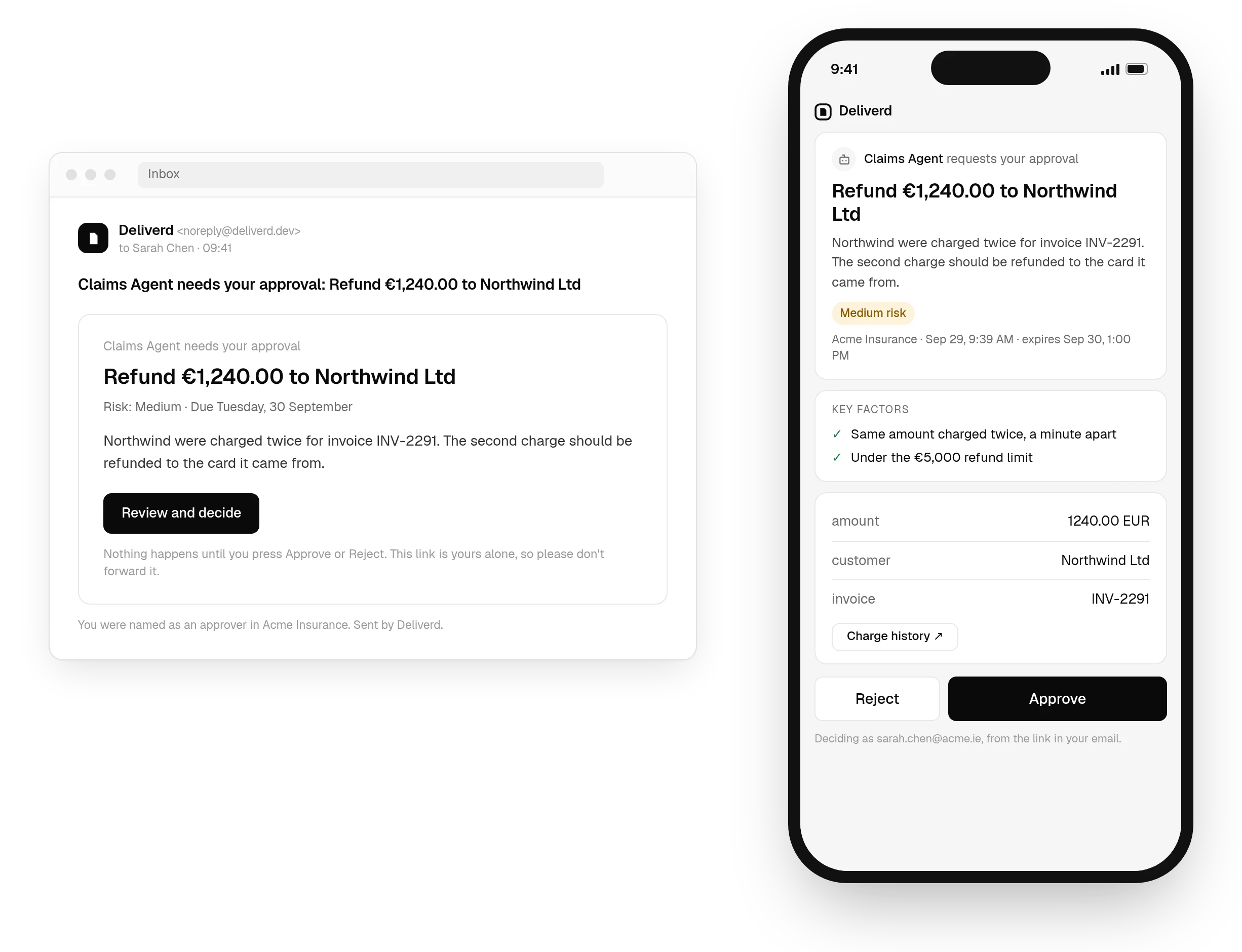
request_approval over the connection above, answered on a page that works on a phone, with the decision back in Cursor as soon as it is made. See how approvals work →Questions
Cursor and Deliverd.
Where does the config go?
~/.cursor/mcp.json for every project, or .cursor/mcp.json inside one. Merge the entry into what is already there — replacing the file removes the other servers you had configured.
Do I have to paste a token into the file?
No, and you should not. The entry holds only a URL; Cursor registers itself and you approve the connection in a browser. A pasted token is a long-lived credential sitting in a plaintext file in your home directory.
What can Cursor do once it is connected?
Ask a named person for approval, a review or information it is missing, check a gate before a consequential action, and keep a task's objective and state across sessions — all over the same connection. It can also publish a report, update it in place, read reader comments and resolve them.
Can I publish a multi-file bundle?
Yes — a folder or a zip with an index.html, up to 500 files. Use relative asset paths and they resolve correctly once published; scripts from the major CDNs are fetched and bundled in, so the page keeps working even if the CDN does not.
Let Cursor act. Know who said it could.
One call to ask a person, answered where they are, and a record of who allowed what — from the tool you already have open.