Gemini CLI · MCP
Gemini does the work.
A person signs it off.
Get the right person's approval before Gemini acts — on their phone, in Teams or by email — with the answer back in the session and kept on the record. Today it asks for confirmation in the terminal that started it; add the MCP server and the question goes to the person who owns the decision.
No card required · Approvals on every plan · No token to paste
The situation
What happens when Gemini CLI needs a person today
The confirmation is in the terminal
Gemini stops before a tool runs and asks whoever launched it. The person who should decide — the lead, the on-call engineer, the client — is somewhere else.
Auto-approve is a decision nobody made
Prompt fatigue ends in auto-approve. From then on nothing is weighed, and nothing records that the check was switched off.
The session ends; the record never existed
What was allowed, by whom and on what evidence lives in a scrollback buffer. When the action is questioned, there is nothing to export.
Setup
Connect Gemini CLI
One command in the terminal, then Gemini can ask a person before it acts — and publish what it writes.
gemini mcp add --transport http deliverd https://deliverd.dev/api/mcp
- 1
Add the server
gemini mcp add --transport http deliverd https://deliverd.dev/api/mcp
- 2
Approve it
/mcp auth deliverd
Inside Gemini, if it has not already opened a browser for you.
No token is written anywhere. Deliverd implements the MCP authorization spec, so the client registers itself and you approve it in a browser — and removing someone from your organisation cuts their connection off at once, rather than whenever a token happens to expire.
What you get
Once it is connected
Everything below is one call from Gemini CLI, over the connection you just made — the ask first, and publishing last.
One call to ask a person
request_approval, request_review or request_information over the connection above. The agent says what it wants to do, why, and what it affects, and the question goes to a named person — not to whoever is at the keyboard.
Decided wherever they are
They approve, correct a figure the agent marked as correctable, reject with a reason or ask the agent a question — on a page built for a phone, from an email link, or from a Slack or Teams card. A colleague can cover while they are away.
The agent carries on
The decision comes back as something the agent can branch on: poll get_approval, wait on a callback URL, or let the SDK block. Approved, it does the action. Rejected, it stops and knows why.
A check before it acts
Before a payment, a deployment or a message to a customer, check_gate declares the action. With no rules a named person decides every one; with rules, the routine cases are settled and the rest go to a person.
A record of who allowed what
Who was asked, what they were shown, what they decided and when — kept as the work happens, and exported as an evidence pack in JSON, CSV or PDF with a digest so an altered copy can be told apart.
And when there is a report, a URL instead of a file
publish_report puts the HTML the agent writes on an address behind your organisation's sign-in, versioned, with comments anchored to the passage they are about. One capability among the rest, over the same connection.
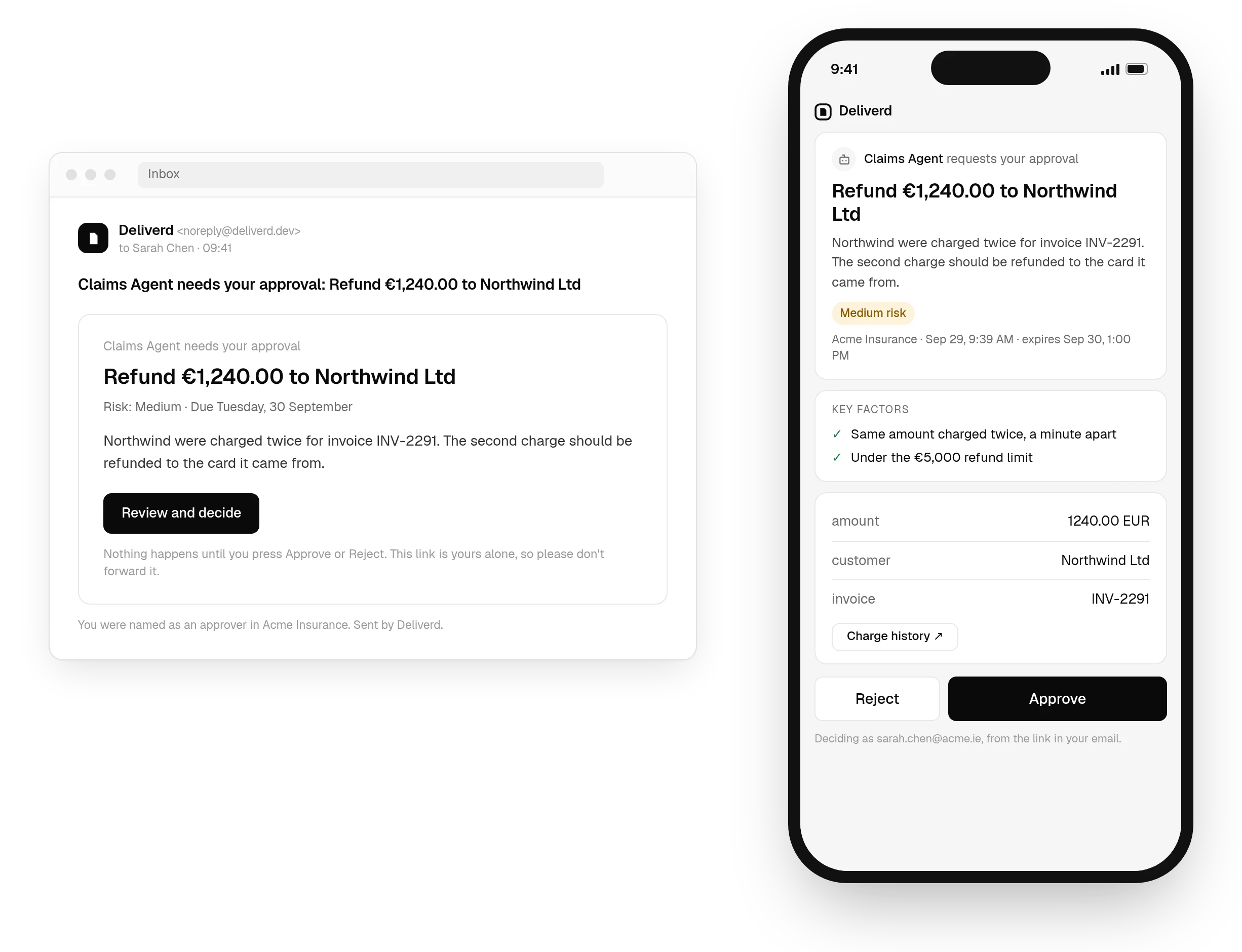
request_approval over the connection above, answered on a page that works on a phone, with the decision back in Gemini CLI as soon as it is made. See how approvals work →Questions
Gemini CLI and Deliverd.
Do I need a token?
No. Gemini CLI supports OAuth for remote MCP servers: the first connection is refused, Gemini discovers the sign-in, opens a browser, and you approve it. Nothing is pasted into a config file.
What if the browser does not open?
Run /mcp auth deliverd inside Gemini. The approval needs a machine that can open a browser and receive a redirect on localhost, so a headless server or a remote SSH session is the one place this does not work — use the CLI with a token there instead.
Where is the server stored?
In Gemini's settings.json — your user settings by default, or the project's .gemini/settings.json with --scope project. The entry holds only the address.
What can Gemini do once it is connected?
Ask a named person for approval, a review or information it is missing, check a gate before a consequential action, and keep a task's objective and state across sessions — all over the same connection. It can also publish a report, update it in place, read reader comments and resolve them.
Let Gemini CLI act. Know who said it could.
One call to ask a person, answered where they are, and a record of who allowed what — from the tool you already have open.