Deliverd Publishing · what the agent made, behind your own sign-in
The agent made it.
People need to read it.
Publishing is how an agent's work reaches people: a report, a dashboard or a prototype on a secure address, opened with the reader's own sign-in, versioned, commented on, and printed to a PDF when somebody needs a file. One of the primitives, and the only one that needs a report to exist.
On every plan · Unlimited viewers · MCP, REST, CLI and SDKs for TypeScript and Python
One call, or one MCP tool
From the tool that made it, to the people who need it.
Any agent, a CI job or a line of TypeScript. The audience is named in plain English and resolved to people; the HTML is scanned, versioned and served from an origin that never sees your sign-in.
import { deliverd } from "@deliverd/sdk";

const { report } = await deliverd.reports.publish({
  title: "Q3 claims loss analysis",
  content: html,
  audience: "Finance",
});

console.log(report.url); // https://reports.acme.com/q3-claims
Built for client work
Your work has to leave the building.
Consultancies, accountancy practices, research firms and insurance brokers all produce the same thing: analysis somebody else pays for and keeps — and signs off before it leaves. Deliverd is where that happens, and where it is published when it does.
It leaves as an address, not a file
The deliverable lands on a URL you send. Reissue it and the same address carries the new version, so nobody is holding a copy you cannot reach.
It opens behind their sign-in
Your client's people authenticate with the identity their own organisation uses. Readers outside any directory verify an emailed one-time code instead.
It is still explicable a year later
Who published it, who opened it, what changed between versions and who was granted access — kept, and exportable, for as long as your policy requires.
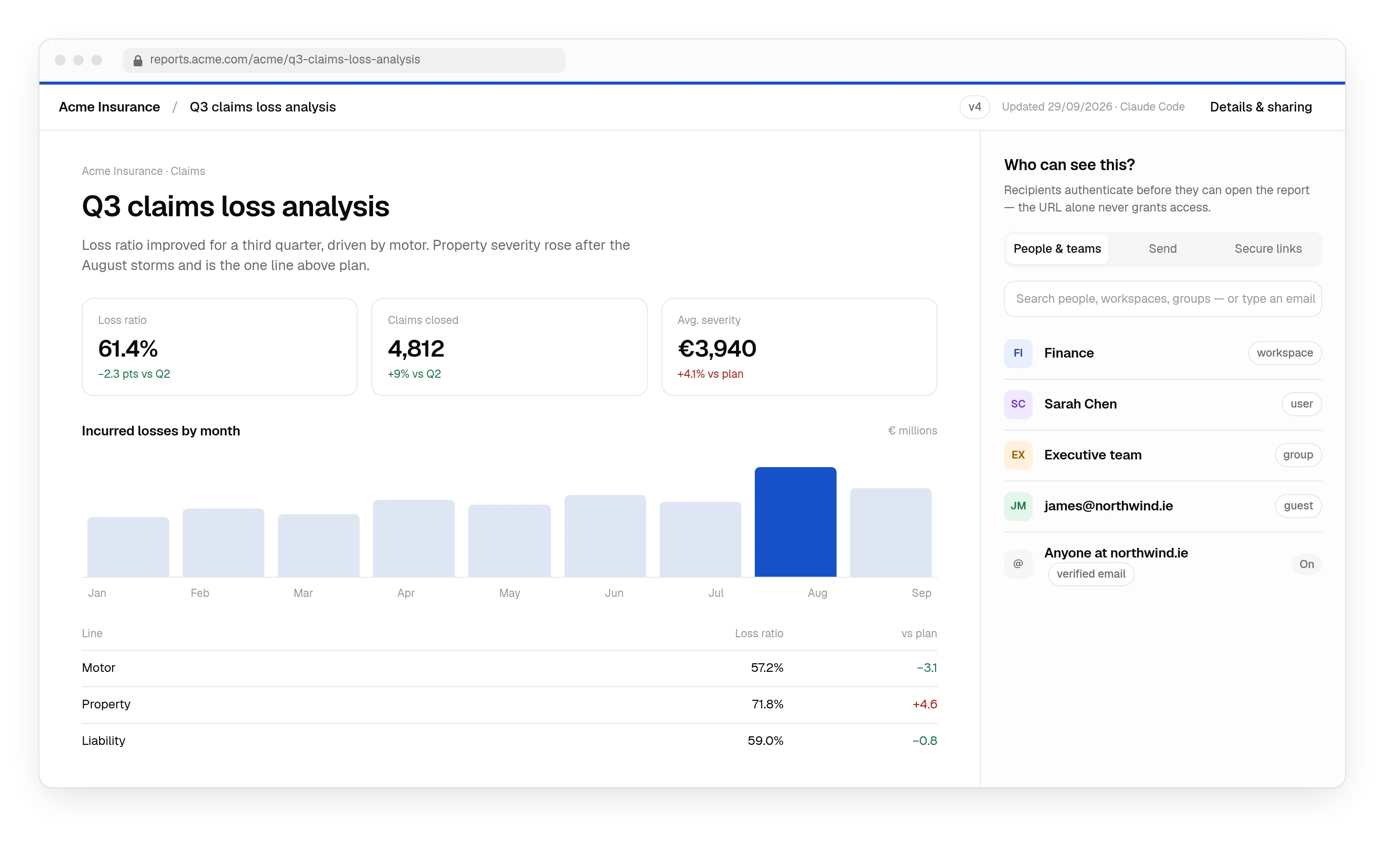
Publishing
The agent can create the report. Sharing it is still the hard part.
Generate it, download the file, find somewhere to host it, work out access, send a link, do it again next week. Four steps replace all of it, and the last one runs without you.
Publish from where the work happens.
Any agent, a CI pipeline or a curl call, over MCP, the REST API, the SDKs or the CLI. One call turns the output into a report at a stable address — no export, no reformatting, no hosting to set up.
Connect a tool$ your-agent › Build the Q3 claims loss analysis and publish it to Finance. ✓ Report built · 3 files · 412 KB ✓ Scan passed ✓ Published v4 → Finance (8 people) https://reports.acme.com/q3-claims
Publish to people. Not just URLs.
Send it to a named person, a workspace, a directory group or a verified guest. The audience is checked every time the report is opened, so forwarding a link forwards nothing.
How access worksRecipients authenticate before they can open the report — the URL alone never grants access.
One report. One URL. Every version.
Share the address once. Humans and agents keep updating what sits behind it, and every version is kept, scanned and restorable — so last month's numbers are never a mystery.
About living reports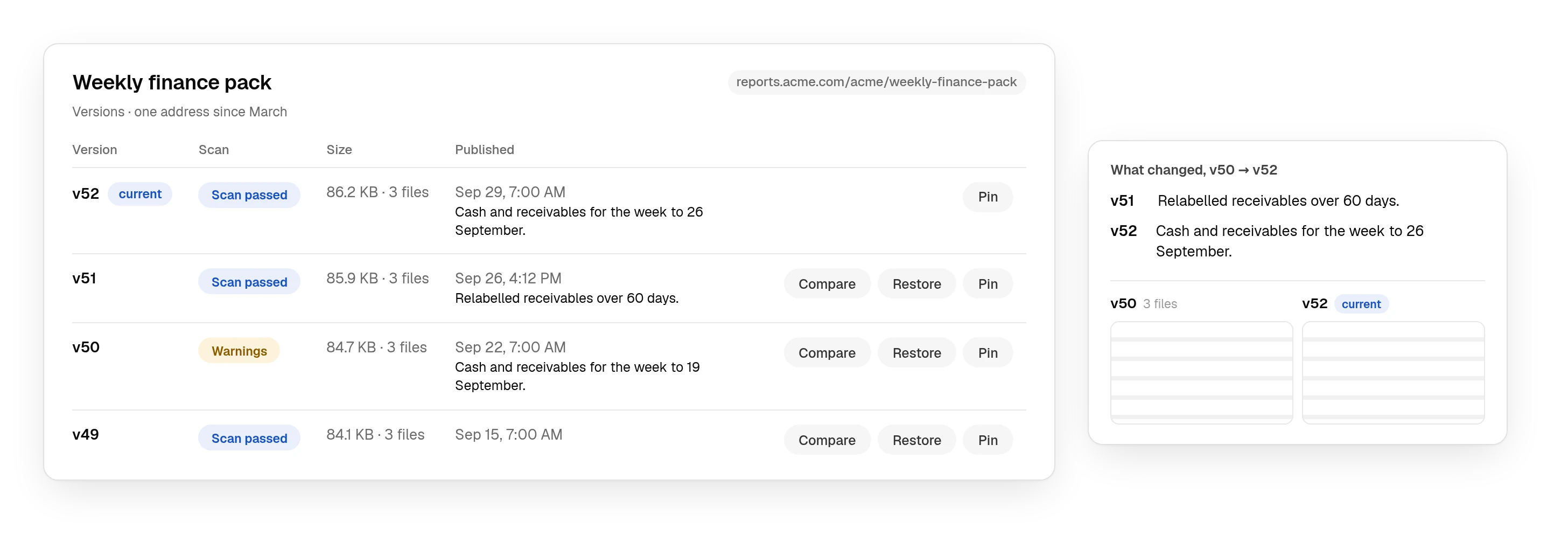
And next week it goes out again, from the same address.
Weekly finance, daily operations, monthly risk. Your agent asks what is due, publishes the new version, and the same people open the same link. No new URL, no permissions to set again.
See the API- Audience
- Finance · 42 people
- Schedule
- Mondays, 07:00
- Latest
- v52 · this morning
- Next
- Monday, 07:00
Humans and agents
The report keeps improving after you send it.
A comment does not mean a reply thread in someone's inbox. It sits on the passage, and it reaches the agent that wrote it.
Feedback goes back to the AI.
Reviewers comment on the live report. Your agent reads the threads, fixes what they point at, publishes the next version and marks them resolved. The address never changes.
Comments on the passage, not the page.
A reader selects a sentence and comments on that. The thread stays attached to the passage as the report is republished, so a note about the forecast is still beside the forecast three versions later.
Two agents cannot quietly overwrite each other.
Pass the version you read and a publish that has been overtaken is refused, telling the agent which version is current so it can re-read and redo its change rather than flattening someone else's.
Everything it does
What a report can do once it lives at an address.
Every one of these ships today, and each is pinned to the code that makes it true.
One address, every version
The report lands on an address you can send — on your own domain, on the paid plans. Publishing again puts a new version behind the same URL and keeps every earlier one, scanned and restorable, so the link you shared in March still opens today's numbers.
Behind the reader's own sign-in
Send it to a named person, a workspace, a directory group, an email domain or a verified guest. Readers authenticate with the identity their organisation already uses, or by a one-time code; the audience is checked on every request, so a forwarded link forwards nothing.
Nothing overwritten by accident
Pass the version you read and a publish that has been overtaken is refused, telling the agent which version is current. Roll back to any version, or pin one so every reader sees it until you unpin.
A PDF when they need a file
Some readers file things. Add ?format=pdf to a report's link, or use the download control, and the current version is rendered to a PDF for that reader — the same access check, the same watermark, nothing to export by hand.
A portal at your address
The root of your reports host lists every report the signed-in reader is allowed to open — the one link a client keeps, instead of one link per pack.
Comments that reach the agent
A reader selects a sentence and comments on it. The thread stays attached to that passage across versions, and the agent reads the threads, fixes what they point at, republishes and marks them resolved — or asks for all of them as one revision brief.
Numbers that refresh without republishing
A report can read datasets you update through the API, so a dashboard shows this morning's figures without a new version. The report itself is still stored, signed bytes behind the same access check.
Recurring, from the same address
Put a report on a schedule and the agent is told when it is due. It publishes the new version, the same people open the same link, and nothing has to be shared again.
Held for approval before it leaves
A publishing rule can hold a version for a person's approval: it is stored and scanned, the reader sees nothing until someone with the authority says so, and the decision is on the record. Off by default; switch it on for agent publishes, for anything addressed outside the firm, or both.
A watermark per reader
Switch it on in the sharing policy and each reader sees the report with their own identity across it — so a screenshot says who took it.
Inside your SharePoint
Allow a SharePoint site by origin and any report can be framed on a page there. It is still served and access-checked here: the page shows the report to the people who may open it and a sign-in link to everyone else.
Secrets caught before they go live
Every bundle is scanned before it goes live for API keys, tokens and private-key material — a hit blocks the publish rather than warning about it — and riskier script patterns are recorded against the version.
Sent to a list, one link each
Send a report to up to fifty addresses with a covering note. Each gets their own link, tied to their own guest record, so the audit trail and the analytics still say who opened what.
Start from a report you already have
Offer any report as a template and anyone who can already open it can start from a copy they own. Four sector starters ship with every organisation.
Reports, compared
Why not just use the share button?
Because everything that matters happens after the report leaves you — who can open it, what they see, what changed, and what you can prove a year later. That part belongs to you, not to whichever tool wrote it.
- Claude artifacts
- claude.ai, not a domain of yours
- ChatGPT Sites
- openai.chatgpt.site, or a domain of yours
- Static hosting
- Stable, if you maintain it
- Deliverd
- Stable across every version
- Claude artifacts
- Your Claude organisation, or everyone
- ChatGPT Sites
- Your workspace, named people, or everyone
- Static hosting
- Anyone with the link
- Deliverd
- The people and groups you name
- Claude artifacts
- With a Claude account
- ChatGPT Sites
- With a ChatGPT account, unless it is public
- Static hosting
- They do not
- Deliverd
- Your SAML provider, or a one-time code
- Claude artifacts
- A public link anyone can open
- ChatGPT Sites
- Invited by email; expiry not documented
- Static hosting
- Public, or not at all
- Deliverd
- Verified guests, with an expiry
- Claude artifacts
- Republished in place from the session
- ChatGPT Sites
- Saved as a version, then deployed
- Static hosting
- Overwrite and lose the old one
- Deliverd
- A new version behind the same URL
- Claude artifacts
- Kept on the platform
- ChatGPT Sites
- Kept; the owner can restore one
- Static hosting
- Gone
- Deliverd
- Kept, comparable and restorable
- Claude artifacts
- Comments, unless the link is public
- ChatGPT Sites
- Co-editing inside the workspace
- Static hosting
- Nowhere
- Deliverd
- Comments on the passage, readable by your agent
- Claude artifacts
- Only from a signed-in Claude session
- ChatGPT Sites
- From a signed-in ChatGPT or Codex session
- Static hosting
- A deploy key that can write anything
- Deliverd
- A scoped identity that cannot publish publicly
- Claude artifacts
- Not documented
- ChatGPT Sites
- Visitors and page views, except on Enterprise
- Static hosting
- Server logs, if you keep them
- Deliverd
- A count on every plan, names on paid ones
- Claude artifacts
- Private sharing needs Team or Enterprise
- ChatGPT Sites
- Plus, Pro, Business, Enterprise or Edu
- Static hosting
- Storage and bandwidth
- Deliverd
- Seats. Readers are never billed.
| What you are comparing | Claude artifacts | ChatGPT Sites | Static hosting | Deliverd |
|---|---|---|---|---|
| The address | claude.ai, not a domain of yours | openai.chatgpt.site, or a domain of yours | Stable, if you maintain it | Stable across every version |
| Who can open it | Your Claude organisation, or everyone | Your workspace, named people, or everyone | Anyone with the link | The people and groups you name |
| How they sign in | With a Claude account | With a ChatGPT account, unless it is public | They do not | Your SAML provider, or a one-time code |
| External reviewers | A public link anyone can open | Invited by email; expiry not documented | Public, or not at all | Verified guests, with an expiry |
| Updating it | Republished in place from the session | Saved as a version, then deployed | Overwrite and lose the old one | A new version behind the same URL |
| Earlier versions | Kept on the platform | Kept; the owner can restore one | Gone | Kept, comparable and restorable |
| Review | Comments, unless the link is public | Co-editing inside the workspace | Nowhere | Comments on the passage, readable by your agent |
| Letting an agent publish | Only from a signed-in Claude session | From a signed-in ChatGPT or Codex session | A deploy key that can write anything | A scoped identity that cannot publish publicly |
| Who actually opened it | Not documented | Visitors and page views, except on Enterprise | Server logs, if you keep them | A count on every plan, names on paid ones |
| What you pay for | Private sharing needs Team or Enterprise | Plus, Pro, Business, Enterprise or Edu | Storage and bandwidth | Seats. Readers are never billed. |
The last row is the one that compounds. Every plan includes unlimited viewers, so the cost of a report reaching one more person is nothing — you pay for the people who publish and manage, never for the people who read. See what that costs.
The Claude artifacts column is drawn from Anthropic's Claude Code artifacts documentation, checked on 5 September 2026. The ChatGPT Sites column is drawn from OpenAI's guide to creating and managing ChatGPT Sites and OpenAI's Sites developer documentation, checked on 17 September 2026. Where nothing is published, the table says so rather than guessing. The longer comparison.
Works with the tools your team runs agents in, and the models they call
Questions
Publishing and Deliverd.
Do viewers need a Deliverd account?
Usually not. They sign in with your organisation's identity provider, or as a verified guest using a one-time code sent to their email.
Can I share with exactly one person?
Yes. Access can be granted to a named person, a workspace, a directory group, the whole organisation, or a verified external guest.
Can recurring reports keep the same URL?
Yes. Your agent publishes a new version on its schedule and the URL, audience and permissions stay exactly as they were.
Can I publish interactive HTML?
Yes. CSS, JavaScript, charts, tabs and local assets keep working. Generated HTML is served from an isolated origin, separate from the Deliverd control plane, and scanned before it goes live.
Can a dashboard show current numbers without republishing it?
Yes. A report can read datasets you update through the API, so the numbers refresh without a new version. The report itself is still stored, signed bytes — there is no code execution on our side, and the data is behind the same access check as the report.
Can we reuse a report as a template?
Yes. Offer any report as a template and anyone who can already open it can start from a copy they own. Marking it as a template does not change who can see it, and the copy carries no audience from the original.
Can two agents publish the same report at once?
They can, and without care the second would silently overwrite the first. Pass the version you read and a publish that has been overtaken is refused, telling you which version is current so the agent can re-read and redo its change.
What happens to old versions?
They are kept. You can roll back to any of them, or pin the report to one version so every reader sees it until you unpin.
Can an agent publish on its own?
Yes. Agents get their own identity, scoped to what each may ask for and where it may publish, and you define the workspaces and audiences each one may publish to. An agent can never make a report public — that is enforced in code, not by configuration.
What happens when someone forwards a link?
Nothing they did not already have. The URL is not the permission — every request is evaluated against your organisation's identity and sharing policy, so the recipient still has to satisfy it.
Can a report sit inside our SharePoint or intranet?
Yes. An administrator allows your SharePoint site by origin, and any report can then be framed on a page there with an embed snippet. The report is still served and access-checked by Deliverd; a reader who is not signed in gets a link that opens it in a new tab.
Can we set rules about what may be published?
Yes, on Business and above. Publishing policies are evaluated on every publish and share — deny external sharing for a classification, cap how long a link may live, require a workspace — and there is a tester that shows what a given publish would do before anyone tries it.
What happens when someone without access opens a link?
They can ask. The page offers a request-access form; the report's owner is notified, approves or declines from the report's page, and the requester is told. Nobody has to forward the link to the right person to find out who that is.
What if the AI put a secret in the report?
The publish is blocked. Every bundle is scanned before it goes live for API keys, tokens and private-key material — AWS, GitHub, Slack, Stripe, OpenAI, Anthropic and the generic shapes — and a hit is a blocker, not a warning. Riskier script patterns are recorded as warnings against the version.
Publish it to an address, not a file.
And when the agent needs a person before it publishes — a partner’s sign-off, a reviewer’s read, a figure it is missing — that is the same API: approvals, reviews and requests.