For consultancies
AI drafted the pack.
A partner signed it off.
Get a partner's sign-off on everything an agent drafts for a client, without chasing anyone for it. When the steering-committee pack is ready, the agent stops to ask the partner who owns the engagement — on their phone or from an email — and carries on when they answer. The client then opens the signed-off version at one secure address under your firm's name, and the record shows who approved what the client saw.
No card required · Approvals on every plan · Secure by default
What you get
What Deliverd changes for consultancies.
The partner's sign-off, without the chasing
The agent asks the partner who owns the engagement, on their phone or from an email, and picks up again the moment they approve, correct a figure or send it back with a reason.
How: Your AI asks before it acts ↓The client gets the version a partner approved
Nothing addressed to a client goes live until someone with the authority has said so, and the client opens it at one address rather than a forwarded attachment.
How: Sign-off before it leaves ↓Who signed off what the client saw, on file
The ask, the sign-off and every view are one record, exported as a single pack when a recommendation is questioned a year later.
How: One pack for the auditor ↓The situation
What this looks like today
The agent drafted it; nobody signed it off
A model wrote the first draft and a partner's name goes on the last. Between the two there is no step where the agent stops and asks, no page where the partner decides, and no record that anyone checked.
Version drift, discovered in the room
Two people open what they believe is the same pack and disagree about a number. The attachment is a copy the moment it is sent, so there is no way to reach the one somebody is holding.
A year later, nobody can reconstruct it
When a recommendation is questioned, what you need is who signed it off, what they were shown, when, and who read it. What you have is a shared drive and a mail archive.
How it works
Deliverd for consultancies
Everything below ships today. Where something needs a paid plan, it says so.
Your AI asks before it acts
An agent that needs a decision puts it to a named person and waits: what it wants to do, why, how risky it is, and what to read first. They approve, approve with changes, reject with a reason, or ask the agent a question — on the page, from an email link, in Slack or Teams, or from a push notification on a phone — and a colleague can cover their approvals while they are away. It can also ask for a review, or for information it is missing, the same way.
Sign-off before it leaves
A publishing rule can hold work for a partner's approval: the version is stored and scanned, the client sees nothing until someone with the authority says so, and the decision is on the record. Off by default; switch it on for agent publishes, for anything addressed outside the firm, or both.
An address, not an attachment
The work lands on a URL you can send. It stays put, so the link you shared at the kick-off still opens today's version rather than a copy of what it looked like in March.
Opened with the client's own sign-in
Readers authenticate with the identity their organisation already uses, including SAML and OpenID Connect single sign-on. Nobody gets a password to remember, and nobody gets a file to leave with.
It looks like your firm
Your name and logo, on your own verified domain, with notifications sent from your domain once it is verified. On the paid plans the reader sees your practice rather than ours.
The work keeps its objective
A task holds what the work is for apart from the conversation doing it, with a short state — where it stands, the next action, what is in the way — that any agent reads when it resumes. Side tasks take a bug or a piece of research out of the main thread and come back with a result. Switch tool or model and the next one picks up where things stand instead of starting over, and only a person changes the objective.
Included in Team, Business Starter, Business and Enterprise
A second thought, where it matters
Your organisation writes rules for requests that touch someone's job, money, health or privacy, or that cannot be undone. When one matches, whoever decides sees the concern first and has to say why it is right to go ahead; a rule can also ask more people to agree, or refuse. Ethics rules only add oversight — none of them can approve anything — and they are on every plan.
Every version kept, one URL
Reissuing updates the address and keeps what was there before. You can see what changed between two drafts and roll back if the new one is wrong.
A record of who opened it
Views, versions, access changes and share links are written to an audit trail you can export — which is the difference between believing a client saw something and being able to show it.
A workspace per client
Segment who can reach what, so an analyst on one engagement cannot browse another. Access is decided per report and evaluated on every request, assets included.
Inside the client's own intranet
Allow a SharePoint site by origin and a report can be framed on a page there. It is still served and access-checked here, so the page shows the report to the people who may open it and a sign-in link to everyone else.
One pack for the auditor
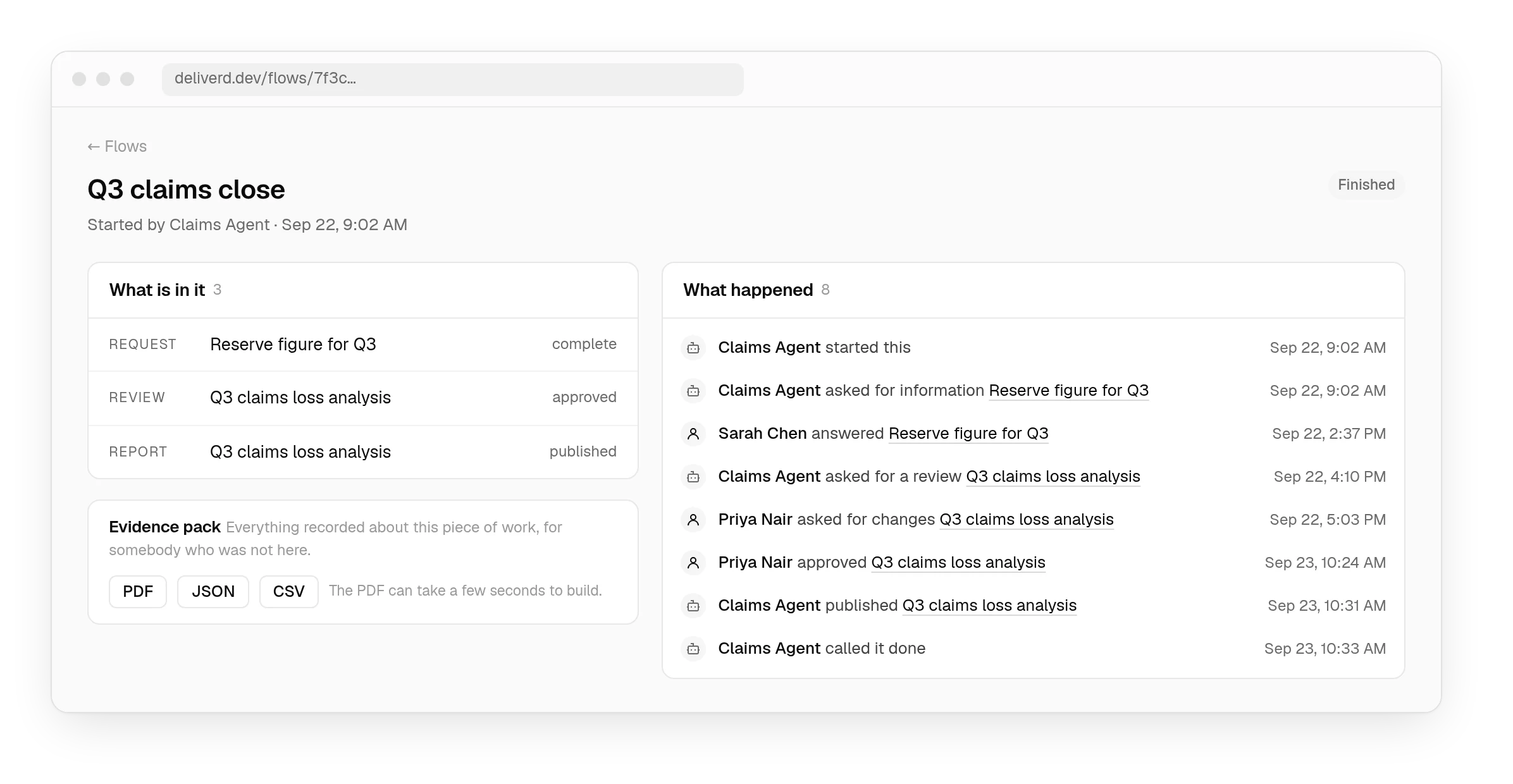
Every step of a piece of work — who was asked, what they said, what was decided and when — exported as a single timeline in JSON, CSV or PDF. It carries a digest and the head of the hash-chained audit trail, signed with a published key, so anyone can check a copy offline, and the export itself is on the record.
Questions
Consultancies and Deliverd.
Can the agent ask a partner to sign off before the pack goes to the client?
Yes, two ways. Before it acts, the agent asks a named partner with request_approval and waits: they approve, correct a figure the agent marked as correctable, reject with a reason or ask the agent a question, from a phone or an email link. And a publishing rule can hold any publish for a partner's approval, so nothing addressed to a client goes live until someone with the authority says so.
Can we show who approved what a client was shown?
Yes. The approval, the publish and every view are on one record — who was asked, what they saw, what they decided and when — exportable as an evidence pack with a digest, so an altered copy can be told apart.
Can each client only see their own engagement?
Yes. Give each engagement a workspace and grant access per report. Access is evaluated on every request, including images and other assets, so nothing is reachable by guessing a URL.
What if the client's people are not in any directory we control?
They do not need to be. A share link can require the reader to verify an emailed one-time code before it opens, and can be restricted to their firm's email domains.
Does it carry our branding or yours?
Yours, on the paid plans: your name and logo, your own verified domain, and notifications sent from your domain once its DNS records are in place.
Can we prove what a client was shown?
Views, version changes, access grants and share links are all written to an audit trail you can export. Retention is set by your plan, longer on the higher plans; on Enterprise your administrators set it, up to ten years.
Can an agent working with client data be made to stop and ask?
Yes. Two starter ethics rules fit engagement work: “Health and personal data” asks whether there is a lawful basis when a request involves health or other special-category personal data, and “Messages sent in someone else's name” asks whether a recipient would be misled about who wrote something or what it commits to. They arrive switched off; turn them on and a flagged approval needs a reason before anyone goes ahead.
Your name goes on it. Make sure a person put it there.
Let the agent draft the pack, put the sign-off in front of the partner who owns it, and send the client an address rather than an attachment.