Windsurf · MCP
Cascade does the work.
A person signs it off.
Get the right person's approval before Cascade makes a change that matters, and keep a record of who allowed it. The step it pauses on is confirmed today by whoever is in the editor; one entry in its MCP config and it asks the person who should decide instead, and carries on when they answer.
No card required · Approvals on every plan · No token to paste
The situation
What happens when Windsurf needs a person today
Cascade asks the person in the editor
It stops before a command runs and asks whoever is looking at Windsurf. The person who should decide about a production change or a message to a customer usually is not.
The decision is gone when the session is
Every confirmation is a click in a panel. When the change is questioned later, there is no record of who allowed it or what they were shown.
The log says what ran, not who allowed it
When one step turns out to matter, the question is who said it could and what they were looking at. A session log was never built to answer that.
Setup
Connect Windsurf
Cascade asks a named person before it acts, and publishes what it builds to an address, not a file.
- 1
Add it to ~/.codeium/windsurf/mcp_config.json
{
  "mcpServers": {
    "deliverd": {
      "serverUrl": "https://deliverd.dev/api/mcp"
    }
  }
}
Keep any servers already listed there. The key is “serverUrl” — a plain “url” is ignored.
- 2
Refresh the servers
In Cascade's MCP panel, refresh, then approve the connection in your browser.
No token is written anywhere. Deliverd implements the MCP authorization spec, so the client registers itself and you approve it in a browser — and removing someone from your organisation cuts their connection off at once, rather than whenever a token happens to expire.
What you get
Once it is connected
Everything below is one call from Windsurf, over the connection you just made — the ask first, and publishing last.
One call to ask a person
request_approval, request_review or request_information over the connection above. The agent says what it wants to do, why, and what it affects, and the question goes to a named person — not to whoever is at the keyboard.
Decided wherever they are
They approve, correct a figure the agent marked as correctable, reject with a reason or ask the agent a question — on a page built for a phone, from an email link, or from a Slack or Teams card. A colleague can cover while they are away.
The agent carries on
The decision comes back as something the agent can branch on: poll get_approval, wait on a callback URL, or let the SDK block. Approved, it does the action. Rejected, it stops and knows why.
A check before it acts
Before a payment, a deployment or a message to a customer, check_gate declares the action. With no rules a named person decides every one; with rules, the routine cases are settled and the rest go to a person.
A record of who allowed what
Who was asked, what they were shown, what they decided and when — kept as the work happens, and exported as an evidence pack in JSON, CSV or PDF with a digest so an altered copy can be told apart.
And when there is a report, a URL instead of a file
publish_report puts the HTML the agent writes on an address behind your organisation's sign-in, versioned, with comments anchored to the passage they are about. One capability among the rest, over the same connection.
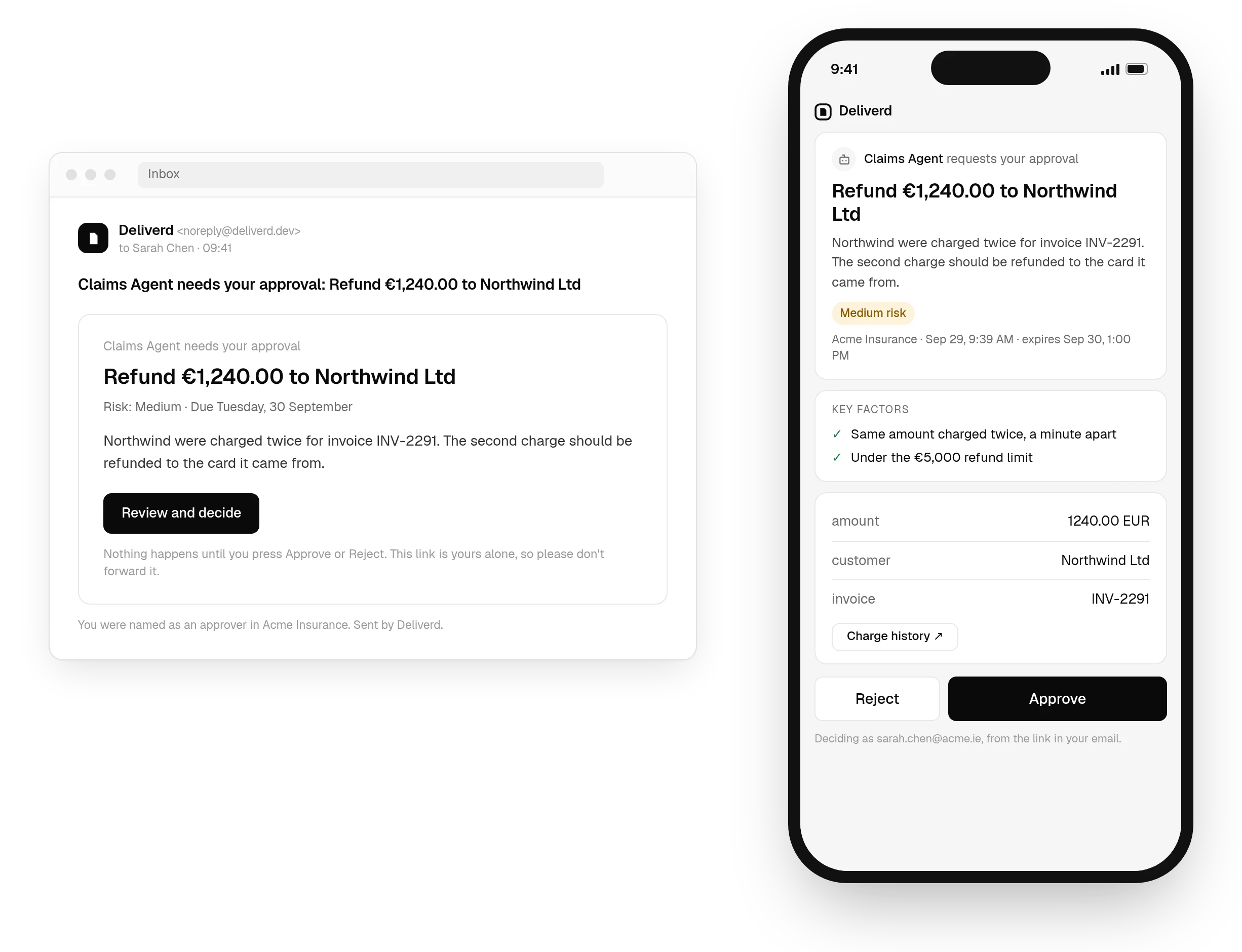
request_approval over the connection above, answered on a page that works on a phone, with the decision back in Windsurf as soon as it is made. See how approvals work →Questions
Windsurf and Deliverd.
Where does the config go?
~/.codeium/windsurf/mcp_config.json. Merge the entry into what is already there — replacing the file removes the other servers you had configured.
Why serverUrl rather than url?
Because that is the key Windsurf reads for a remote server. A plain “url” is silently ignored and the server never appears, which looks like an outage and is a typo.
Do I need a token?
No. Windsurf supports OAuth for remote servers: it registers itself and opens a browser for you to approve the connection. The config holds only an address.
What can Cascade do once it is connected?
Ask a named person for approval, a review or information it is missing, check a gate before a consequential action, and keep a task's objective and state across sessions — all over the same connection. It can also publish a report, update it in place, read reader comments and resolve them.
Let Windsurf act. Know who said it could.
One call to ask a person, answered where they are, and a record of who allowed what — from the tool you already have open.