Your reports, inside your intranet
8 September 2026 · Deliverd Engineering Team · 8 min read

Hello again from the engineering team.
The most common thing people ask us for is not a feature. It is a location.
Can it be in SharePoint?
Not because SharePoint is good at this — it is not, and we will get to why — but because SharePoint is where their colleagues already look. A report nobody finds is a report nobody read, and "check your email for the link I sent in March" is not a filing system.
We spent last week on it. Here is what we found, including the part that did not work.
The obvious answer is a dead end
Publish the report into a SharePoint document library, and let SharePoint host it.
It cannot work, and the reason is not fixable from either side. SharePoint Online enforces strict browser file handling and, unlike the on-premises versions, the setting cannot be changed. An .html file in a document library is always served with headers that force a download. Your carefully built report arrives as a file icon and a Save As dialog.
That rule exists for a good reason — anyone with contributor access could otherwise upload HTML containing script and have it run on the tenant's own origin — so we would not want it changed even if we could.
There is a second cost that has nothing to do with file handling. If SharePoint serves the report, then who may open it, the version history, who actually read it, and the comment threads all become SharePoint's job. Everything we have built would be reduced to a copy step.
Microsoft's own viewers do not close the gap either
We looked properly, because it would have been the tidy answer.
The Office Web Viewer — the view.officeapps.live.com embed — requires the document URL to be publicly accessible. Microsoft's servers fetch the file themselves, so it cannot sit behind a sign-in. Every report here is private by default. Making them world-readable in order to display them is the exact thing this product exists to prevent.
WOPI is the proper integration, the one that powers Office for the web against third-party storage. It requires membership of Microsoft's Cloud Storage Partner Program, which is for vendors whose business is cloud storage and is granted by application. And each reader needs their own Microsoft 365 licence. The external auditor you shared a report with, on a Gmail address, cannot open it. "They get a link, it opens" would stop being true.
So we did the other thing
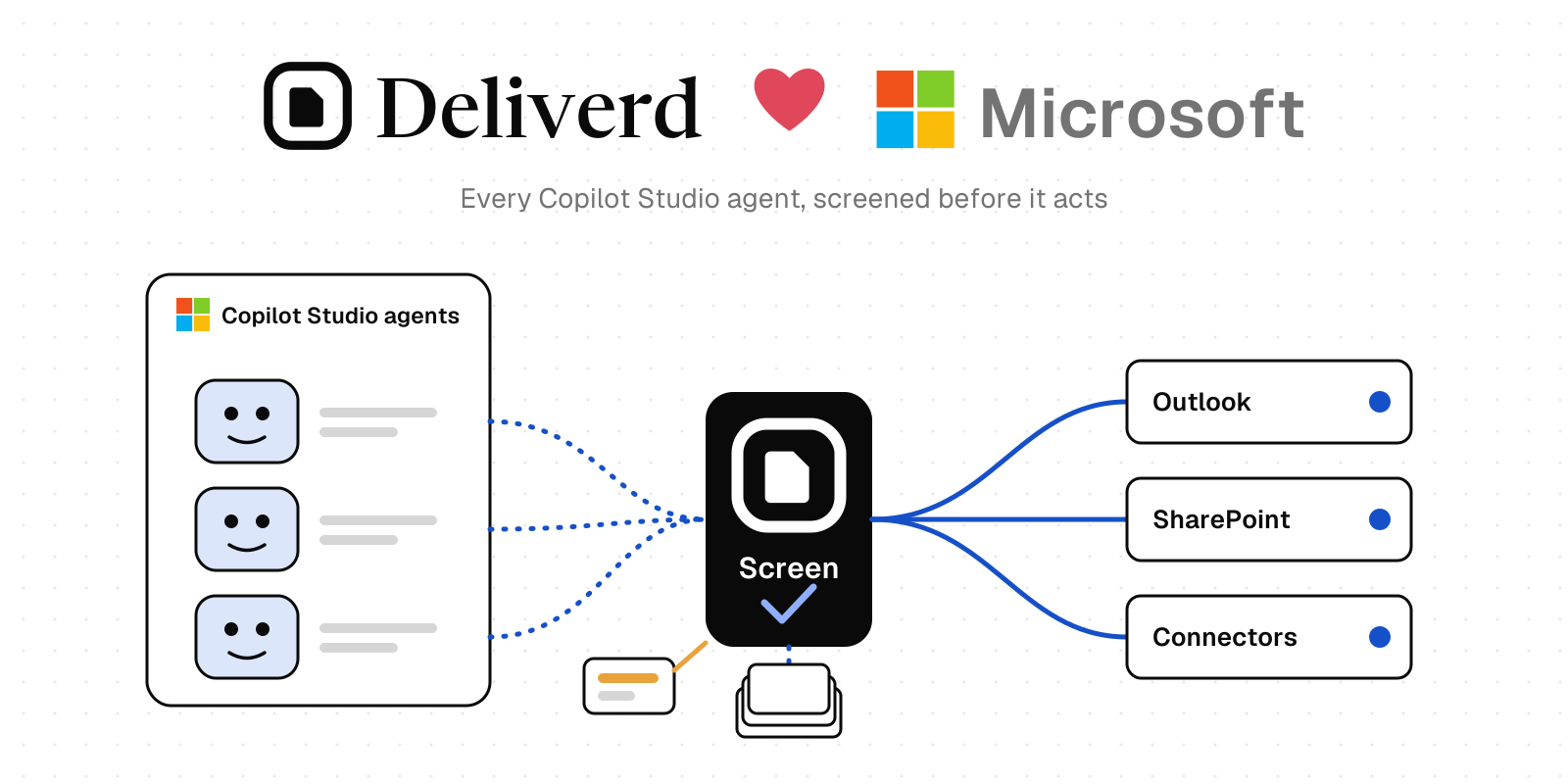
The report stays where it can be rendered and access-checked. SharePoint supplies the frame.
You allow your SharePoint site to embed your reports, add one to a page with the Embed web part, and people read it inside the intranet page they already had open. Underneath, nothing changed: access is still evaluated on every single request, versions still live at one address, comments still anchor to the passage they are about, and every open is still recorded.
The part we cannot fix, said plainly
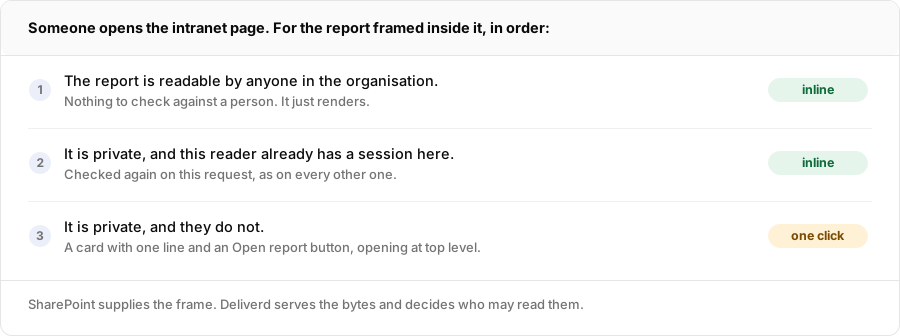
Row three is not a limitation we chose, and no setting on either side removes it.
Our session cookie is SameSite=Lax. A browser will not send a Lax cookie into a frame embedded on a different site — that rule is most of what stops one site acting as you on another. So inside a SharePoint frame, our sign-in step sees no session, redirects to a page that is itself not embeddable, and the reader gets a blank frame.
We could have left the redirect chain running and let it fail quietly. Instead the gateway now recognises a framed cross-site request from its Sec-Fetch headers and stops immediately, serving a card with a button that opens the report in a new tab, where signing in works normally.
It is worse than "they sign in once and then it works", and we would rather say so than let you find out in a demo. A viewer session is filed by the browser under the site of the page it was started on. Open the report directly and it is filed under the report's own hostname; the SharePoint page is filed under sharepoint.com. Those are never the same, so the session does not come back with the reader. Inside SharePoint, a private report shows that card every time, to everyone, forever.
So the honest summary is:
- Reports readable without signing in embed seamlessly. No sign-in, no click, exactly what you pictured.
- Everything else is a one-click doorway. Still useful, still findable, but it is a click, and it stays a click.
Worth deciding which of those you are building before you demo it to anyone. And worth being clear-eyed about the trade if you reach for the first one: a report readable without signing in is readable by anyone holding its address, and putting that address on an intranet page does not change who else could hold it.
A bug we found by building it
The card that says "Open report" carries its own framing policy. It has to, and working out why turned up something that had been broken for a while.
We send X-Frame-Options: DENY on every response. Browsers ignore that header when a frame-ancestors policy is present — which is the only reason our own viewer's iframe works at all. The older fallback page, the one that has been telling readers to open a report in a new tab when their browser refuses a cookie, set no such policy.
So it was blocked by our own header. Nobody has ever seen it. It has been an empty frame, in the one situation it was written to rescue.
We checked that against production rather than reasoning our way to it, which is the only reason we believe it.
Setting it up
Two steps, one on each side, and both are needed.
In Deliverd: Admin → Security → Embedding. Add your site's address — https://contoso.sharepoint.com, the origin only. Everywhere you have not listed is still refused. This does not make anything public; it decides who may frame a report, not who may read one.
On your SharePoint site: SharePoint refuses to embed a domain nobody has approved. The setting is HTML Field Security, and it is worth saying where it is not: it is not in the SharePoint admin centre. It is a site collection setting, reached from the site itself — gear icon, Site information, View all site settings, then HTML Field Security under Site Collection Administration. Choose "allow contributors to insert iframes from these domains" and add our hostname.
Two things follow from that. A site collection administrator can do it, so you do not need a tenant administrator. And each site collection that embeds reports needs its own approval — doing it once does not do it everywhere.
Skip this step and you get a blank frame with nothing in our audit log to explain it, because the request never reaches us. That one will cost somebody an afternoon, so it is worth doing first.
(An earlier version of this post got two things wrong: it put this setting in the admin centre's tenant settings, and it said you could embed a report by pasting its address. Neither is true, and both were found by someone following the instructions and hitting the wall. Corrected above, with thanks.)
Then: edit the page, add the Embed web part, and paste an iframe rather than the address:
<iframe src="https://your-report-address" width="100%" height="900"></iframe>
Pasting the bare address gets you "This website doesn't support embedding using just the address", which sounds like a permissions problem and is not one. SharePoint tries to resolve an address through oEmbed first, and says that about every site it does not already know as a provider. It happens in the browser before any request reaches us. The web part's own second sentence is the fix: embed code, iframe-based.
The src is the report's ordinary address, the same one you would send anybody. There is no special embed link and no token in it.
Tell us if this is the wrong shape
We built the version we could defend. There is another version — pushing a copy of each report into your document library through Microsoft Graph — which is a different answer to a different question: our records must live in our tenant, rather than people want to find it in SharePoint.
If yours is the first one, tell us, because it changes what we build next. And if you try the embed and it behaves in a way this post did not prepare you for, we would very much like to hear that too.
Get in touch, or follow along by RSS.